Remove, replace, and mask
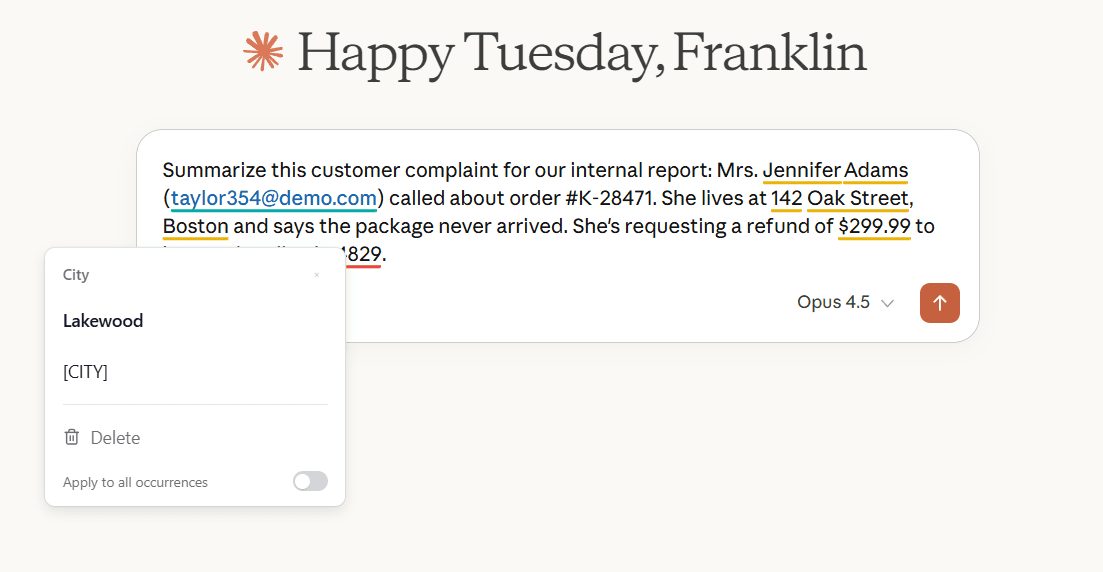
When you see a highlight, hover over it or click the counter panel to see your options.
Remove
Deletes the data from your text entirely. The sentence remains, minus the sensitive part.
Use this when the information isn't needed for your message to make sense.
Replace
Swaps the real data for a fictional alternative of the same type. A real name becomes a different name. A real phone number becomes a different phone number.
Use this when you need the structure of your text intact but don't need the actual data. Useful for examples, drafts, or when asking AI tools for help with templates.
Mask
Replaces the data with a placeholder like [NAME] or [PHONE NUMBER]. The reader sees that information exists but not what it is.
Use this when you want to preserve the structure and show that something was redacted.
Handling multiple instances
If the same name or number appears several times in your text, BeeSensible can apply your choice to all instances at once. Look for the "apply to all" option when you select an action.
After you take action
The highlight changes from yellow or red to teal, confirming the item has been addressed. You can continue reviewing other highlights or proceed with your message.